Showing posts with label wifi security. Show all posts

2023-06-10

WIFI | Aircrack Revisit

Title: Cracking Wireless Networks with Aircrack-ng: A Comprehensive Guide for Network Forensics Experts

Introduction:

Aircrack-ng is a powerful suite of tools used to assess and exploit wireless network security. As a network forensics expert, understanding and utilizing this suite can greatly enhance your skills and capabilities. In this blog post, we'll go through a step-by-step guide on using Aircrack-ng to crack a Wi-Fi network, including the use of deauthentication attacks.

Disclaimer: This information is provided for educational purposes only. Unauthorized access to networks is illegal, and you should only use these techniques on networks that you have permission to access.

Step-by-Step Guide to Using Aircrack-ng


1. Install Aircrack-ng: Before you begin, make sure Aircrack-ng is installed on your system. You can download the latest version from the official website (https://www.aircrack-ng.org/) and follow the installation instructions provided for your specific operating system.

2. Identify the target network: Start by scanning for available Wi-Fi networks in the vicinity using the "airodump-ng" command, which requires an interface in monitor mode. Run the following commands:


# Set the wireless interface to monitor mode sudo airmon-ng start <interface_name> # Scan for available networks sudo airodump-ng <monitor_interface_name>

3.Capture handshake: To crack a WPA/WPA2 network, you'll need to capture the handshake between a client and the access point. Use the "airodump-ng" command to target the specific network and write the captured packets to a file:


sudo airodump-ng -c <channel> --bssid <BSSID> -w <capture_file> <monitor_interface_name>
4. Deauthenticate clients (Deauth Attack): If no clients are connected to the target network or if you want to speed up the handshake capturing process, use a deauthentication attack to disconnect clients from the access point. This will force them to reconnect, thereby generating a handshake. Run the following command:

sudo aireplay-ng -0 <number_of_deauth_packets> -a <BSSID> -c <client_MAC_address> <monitor_interface_name>
  1. Crack the password: Once you've captured the handshake, use Aircrack-ng to crack the password. You'll need a wordlist for this step, which is a file containing a list of possible passwords. Run the following command:

aircrack-ng -w <path_to_wordlist> -b <BSSID> <capture_file.cap>
  1. Analyze the results: If Aircrack-ng successfully cracks the password, it will display the passphrase along with the associated BSSID. You can now use this information to connect to the network.
Summary:
  • Install Aircrack-ng on your system.
  • Identify the target network by scanning for available Wi-Fi networks using "airodump-ng."
  • Capture the handshake between a client and the access point with "airodump-ng."
  • Use deauthentication attacks to speed up the handshake capturing process with "aireplay-ng."
  • Crack the password using a wordlist and the captured handshake with "aircrack-ng."
  • Analyze the results and connect to the network using the cracked passphrase.
By following these steps and employing the tools in the Aircrack-ng suite, network forensics experts can efficiently assess and exploit wireless network security. Remember to use these techniques responsibly and only on networks you have permission to access.

2016-01-28

2016.0128.WEP.WPA


Choosing the right security configuration for your wireless network is very important, especially because hacking is so easy now. Free software tools are now easily available that make it trivial for even unsophisticated "script kiddies" to break into secured wireless networks. Securing your Wi-Fi network with a password is the first step but its efficacy is very low if the security method chosen is WEP. Passwords for Wi-Fi networks secured with WEP can usually be cracked within minutes.[1] WPA2 is the recommended security method for wireless networks today.

Comparison chart

Edit this comparison chart

WEP

WPA

Stands for Wired Equivalent Privacy Wi-Fi Protected Access
What is it? A security protocol for wireless networks introduced in 1999 to provide data confidentiality comparable to a traditional wired network. A security protocol developed by the Wi-Fi Alliance in 2003 for use in securing wireless networks; designed to replace the WEP protocol.
Methods Through the use of a security algorithm for IEEE 802.11 wireless networks it works to create a wireless network that is as secure as a wired network. As a temporary solution to WEP's problems, WPA still uses WEP's insecure RC4 stream cipher but provides extra security through TKIP.
Uses Wireless security through the use of an encryption key. Wireless security through the use of a password.
Authentication method Open system authentication or shared key authentication Authentication through the use of a 64 digit hexadecimal key or an 8 to 63 character passcode.
WEP and WPA security options while connecting to a wireless network

Encryption in a Wi-Fi network

It is possible to "sniff" data being exchanged on a wireless network. This means that if the wireless network is "open" (requires no password), a hacker can access any information transferred between a computer and the wireless router. Not having your Wi-Fi network password-protected also creates problems such as an intruder piggy-backing on your Internet connection, thereby slowing it down or even illegally downloading copyrighted content.
Seucring a Wi-Fi network with a password is, therefore, absolutely essential. WEP and WPA are the two security methods supported almost universally by routers and the devices that connect to them, such as computers, printers, phones or tablets. WEP (Wired Equivalent Privacy) was introduced when the 802.11 standard for Wi-Fi networks was launched. It allows the use of a 64-bit or 128-bit key. However, researchers discovered vulnerabilities in WEP in 2001 and proved that it was possible to break into any WEP network by using a brute-force method to decipher the key. Using WEP is not recommended.
WPA, which stands for Wi-Fi Protected Access, is a newer standard and is much more secure. The first iteration of the WPA protocol used the same cipher (RC4) as WEP but added TKIP (Termporal Key Integrity Protocol) to make it harder to decipher the key. The next version - WPA2 - replaced RC$ with AES (Advanced Encryption Standard) and replaced TKIP with CCMP (Counter mode with Cipher block chaining Message authentication code Protocol). This made WPA2 a better and more secure configuration compared with WPA. WPA2 has two flavors - personal and enterprise.

Other Wi-Fi security best practices

Choosing WPA2 is a good start but there are other things you can do to make your Wi-Fi network even more secure. For example,
  • Do not broadcast SSID: The SSID is the name of the Wi-Fi network. By not broadcasting the SSID, the wireless network becomes "hidden". It will still show up in network scans by devices but they would only see it as "Unidentified Network". When the network broadcasts its SSID (name), the hacker only has to decipher the password. But when the network name is unknown, logging on to the network will require that the intruder must know not only the password but also the SSID.
  • Use a strong password: This one is obvious but bears a mention because it is very important. Computers are very powerful and cloud computing has made it very cheap and easy to rent extraordinarily large raw computational power. This makes brute-force attacks possible, where the hacker tries every combination of letters and numbers until the key is deciphered. A good password has the following characteristics:
    • is longer than 10 characters
    • uses a healthy mix of characters — upper case, lower case, numbers and special characters like ^*
    • is not easily guessable, like a birthday, or name of a family member or pet name
  • Change the default IP address of the router: Virtually all wireless routers are preconfigured to use 192.168.1.1 as the IP address of the router on the network it creates. There are some sophisticated exploits that use this common setting to transmit the infection to the router, thereby compromising not just one computer but all Internet traffic that goes via the router from any device. It is advisable to change the routers IP address to something else, such as 192.168.37.201. 
  • Security measures

    There are a range of wireless security measures, of varying effectiveness and practicality.

    SSID hiding

    A simple but ineffective method to attempt to secure a wireless network is to hide the SSID (Service Set Identifier).[15] This provides very little protection against anything but the most casual intrusion efforts.

    MAC ID filtering

    One of the simplest techniques is to only allow access from known, pre-approved MAC addresses. Most wireless access points contain some type of MAC ID filtering. However, an attacker can simply sniff the MAC address of an authorized client and spoof this addresses.

    Static IP addressing

    Typical wireless access points provide IP addresses to clients via DHCP. Requiring clients to set their own addresses makes it more difficult for a casual or unsophisticated intruder to log onto the network, but provides little protection against a sophisticated attacker.[15]
     
PHV.DCXXIV.2016.0128

2015-08-27

Ten Essential WiFi Hacking Tools

Note: All the information below are from http://www.hackingtutorials.org/wifi-hacking-tutorials/ - for additional cool WiFi info visit their website. 
In this top 10 Wifi Hacking Tools we will be talking about a very popular subject: hacking wireless networks and how to prevent it from being hacked. Wifi is often a vulnerable side of the network when it comes to hacking since signals can be picked up everywhere and by anyone. Router manufacturers and ISPs turning on WPS by default makes wireless security and penetration testing even more important. With the following top 10 Wifi hacking tools we are able to test our own wireless networks for potential security issues. Let’s start off the top 10 Wifi Hacking Tools with the first tool:

1 Aircrack-ng

Aircrack is one of the most popular tools for WEP/WPA/WPA2 cracking. The Aircrack-ng suite contains tools to capture packets and handshakes, de-authenticate connected clients and generate traffic and tools to perform brute force and dictionary attacks. Aicrack-ng is an all-in-one suite containing the following tools (among others):
– Aircrack-ng for wireless password cracking
– Aireplay-ng to generate traffic and client de-authentication
– Airodump-ng for packet capturing
– Airbase-ng to configure fake access points
The Aicrack-ng suite is available for Linux and comes standard with Kali Linux. If you plan to use this tool you have to make sure your Wifi card is capable of packet injection.

Aircrack-ng aireplay-ng WPA Handshake

2 Reaver

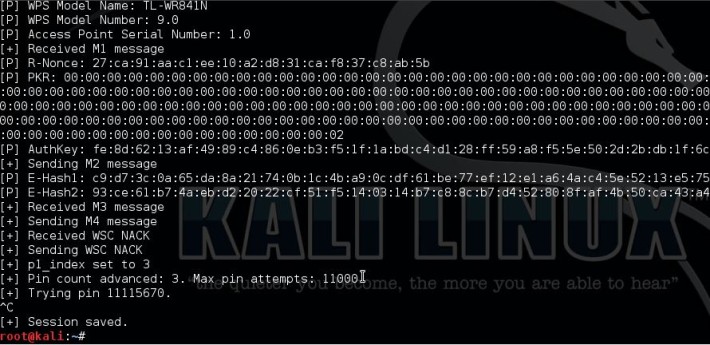
Number 2 in the top 10 Wifi hacking tools is Reaver. Reaver is another popular tool for hacking wireless networks and targets specifically WPS vulnerabilities. Reaver performs brute force attacks against Wifi Protected Setup (WPS) registrar PINs to recover the WPA/WPA2 passphrase. Since many router manufacturers and ISPs turn on WPS by default a lot of routers are vulnerable to this attack out of the box.
In order to use Reaver you need a good signal strength to the wireless router together with the right configuration. On average Reaver can recover the passphrase from vulnerable routers in 4-10 hours, depending on the access point, signal strength and the PIN itself off course. Statistically you have a 50% chance of cracking the WPS PIN in half of the time.

Pixie Dust attack

3 Pixiewps

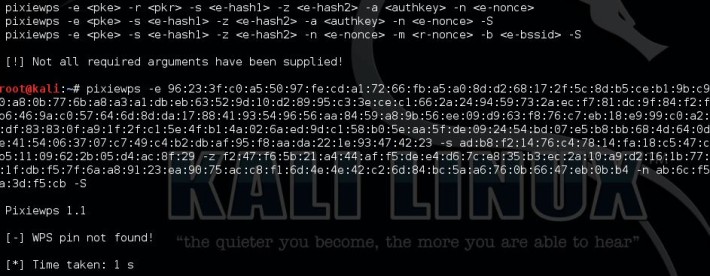
PixieWPS is a relatively new tool included with Kali Linux and also targets a WPS vulnerability. PixieWPS is written in C and is used to brute force the WPS PIN offline exploiting the low or non-existing entropy of vulnerable access points. This is called a pixie dust attack. PixieWPS requires a modified version of Reaver or Wifite to work with. Since this tools has become quite popular in little time, it earns the number 3 in our top 10 Wifi hacking tools list.

Pixie Dust attack

4 Wifite

Wifite is an automated tool to attack multiple wireless networks encrypted with WEP/WPA/WPA2 and WPS. On start-up Wifite requires a few parameters to work with and Wifite will do all the hard work. It will capture WPA handshakes, automatically de-authenticate connected clients, spoof your MAC address and safe the cracked passwords.


5 Wireshark

Wireshark is one of the best network protocal analyzer tools available, if not the best. With Wireshark you can analyse a network to the greatest detail to see what’s happening. Wireshark can be used for live packet capturing, deep inspection of hundreds of protocols, browse and filter packets and is multiplatform.
Wireshark is included with Kali Linux but also available for Windows and Mac. For certain features you do need a Wifi adapter which is supports promiscuous and monitoring mode.


6 oclHashcat

Number 6 in our top 10 Wifi hacking tools is oclHashcat. oclHashcat is not a dedicated Wifi hacking tool and is not included with Kali Linux, but it can do brute force and dictionary attacks on captured handshakes very fast when using a GPU. After using the Aircrack-ng suite, or any other tool, to capture the WPA handshake you can crack it with oclHashcat using your GPU. Using a GPU with oclHashcat, instead of a CPU with Aicrack-ng, will speed up the cracking process a lot. An average GPU can try about 50.000 combinations per second with oclHashcat.
oclHashcat is available for Windows and Linux and has a version for AMD and Nvidia video cards. AMD video cards require Catalyst 14.9 exactly and Nvidia video cards require ForceWare 346.x or later to work.

oclhashcat

7 Fern Wifi Cracker

Fern Wifi Cracker is a wireless security auditing and attack tool written in Python. Fern Wifi Cracker is the first dedicated Wifi hacking tool in this list which has an graphical user interface. Fern is able to crack and recover WEP, WPA and WPS keys and contains tools to perfom MiTM attacks.
Fern Wifi Cracker runs on any Linux distribution which contains the prerequisites. Fern Wifi Cracker is included with Kali Linux.


8 Wash

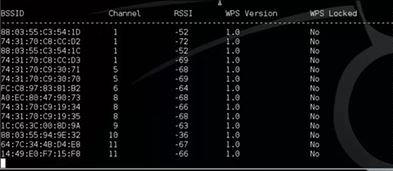
Wash is a tool to determine whether an access point has WPS enabled or not. You can also use Wash to check if an access point locked up WPS after a number of Reaver attempts. A lot of access points locks itself up as a security measure when brute forcing the WPS PIN. Wash is included with the Reaver package and comes as a standard tool with Kali Linux.

Wash-WPS-locks wifi hacking tools Top 10 Wifi Hacking Tools

9 Crunch

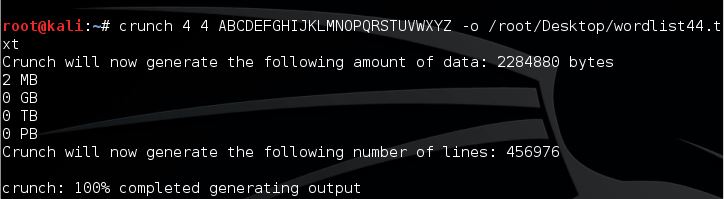
Crunch is a great and easy to use tool for generating custom wordlists which can be used for dictionary attacks. Since the success rate of every dictionary attack depends on the quality of the used wordlist, you cannot avoid creating your own wordlist. Especially when you want to create wordlists based on default router passwords. Crunch can also be piped directly to other tools like Aircrack-ng. This feature can save a lot of time since you won’t have to wait until large password lists have been generated by Crunch before you can use them.

Crunch Password List generation Top 10 Wifi Hacking Tools

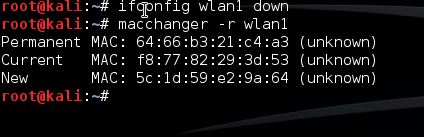
10 Macchanger

Last but not least in this top 10 Wifi Hacking Tools is Macchanger. Macchanger is a little utility which can be used to spoof your MAC address to a random MAC address or you can make up your own. Spoofing your MAC address for wifi hacking might be necessary to avoid MAC filters or to mask your identity on a wireless network.

MAC Address spoofing with macchanger